THE PROJECT GUIDE
What each project does.
Where you can start.
Different products for different needs. Explore their purpose, intended workflow and availability before taking the next step.
I Can Wait
Introductions built around your values, everyday life and the relationship you want, without swiping through a public directory.
Who it is for
Adults in Adelaide who want to meet someone through shared values and relationship goals. I Can Wait’s stated public launch is 25 October 2026.
What makes it different
A written interview gives more context than a short profile. Introductions explain why two people may fit, and a conversation opens only after both accept. An introduction is an opportunity to connect, not a guarantee of a relationship.
The introduction process
- Complete the account, age and camera verification steps when membership opens.
- Answer a written interview about your values, preferences and relationship goals.
- Review introductions when eligible matches are available. If you both accept, chat opens.
I Can Wait’s website explains verification, privacy, membership and the full process.
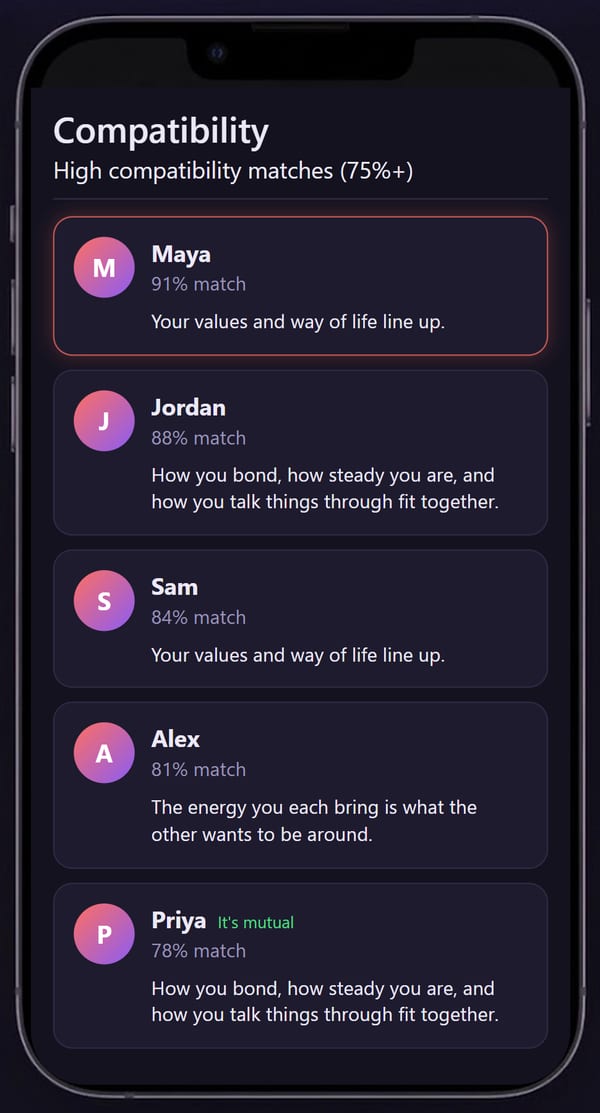
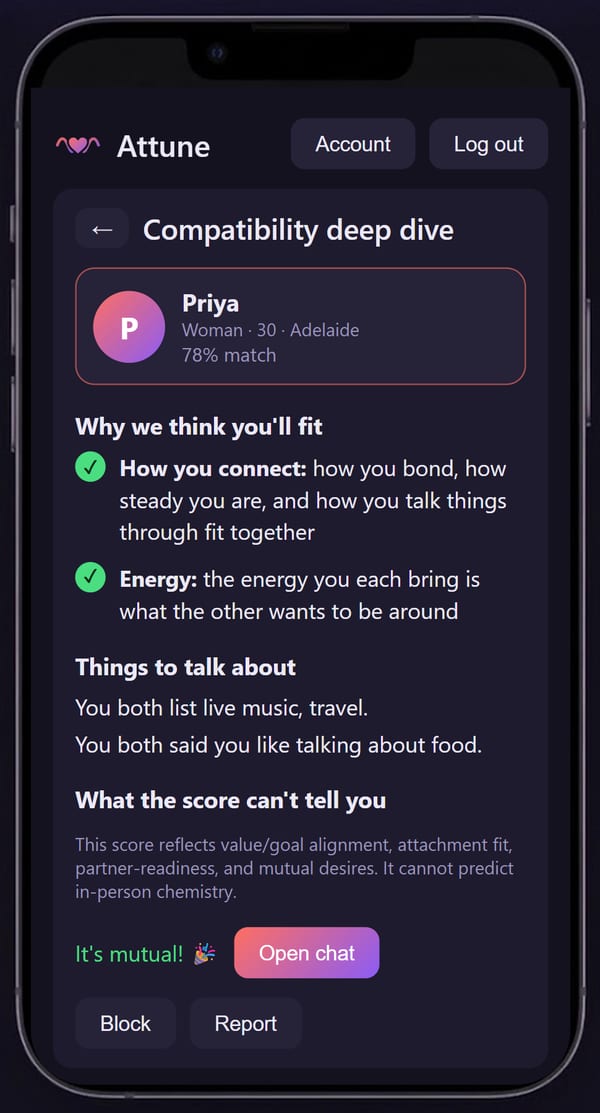
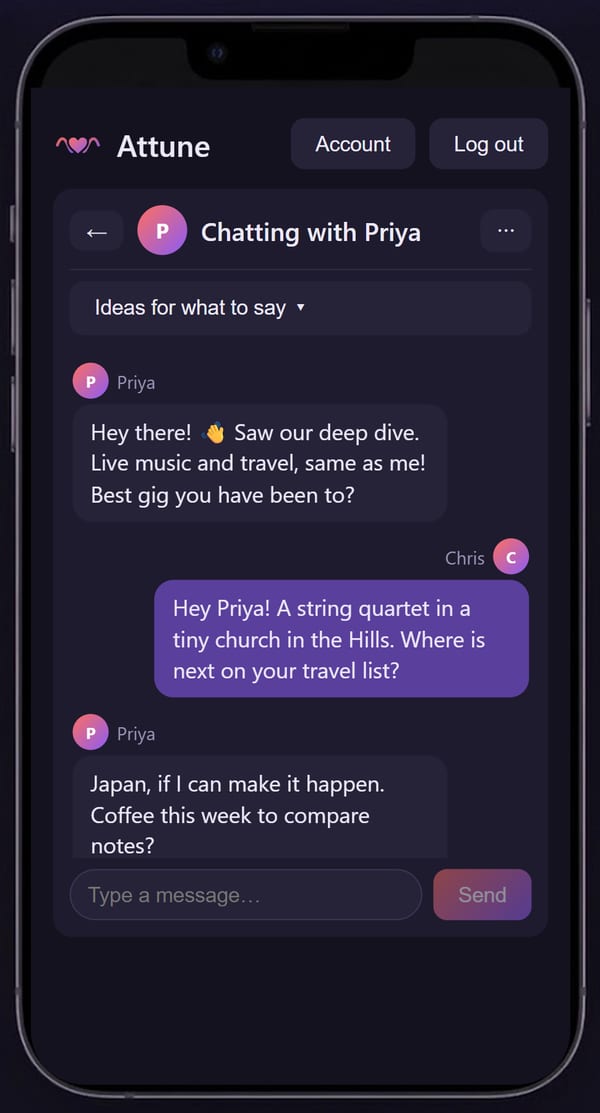
Real app screens published by I Can Wait. People, scores and messages are examples, not member testimonials or evidence of matching outcomes.
Available now: the free Adelaide waitlist. No payment is taken, no subscription starts and no founding membership is reserved by joining. Check I Can Wait’s website for the latest launch information and membership terms.
The Future 24/7
A technology information directory for exploring developments across AI, robotics, energy, space and other fields.
Who it is for
Readers who want to explore a technology topic and follow individual developments without starting from an empty search box.
What you can explore
- Topic collections spanning established and emerging technologies.
- Individual intelligence cards within those collections.
- Published information about data sources and the site’s approach.
A useful first visit
- Choose a topic from the directory, such as AI or energy.
- Open an intelligence card about a development that interests you.
- Check its supporting sources, dates and context before relying on a claim.
Use the data sources and transparency pages to understand the publication’s approach.
The public directory is available to browse. Coverage and individual items change over time; a listing should not be read as independent verification, endorsement or proof that a technology is commercially available.
Billionaire Playbook
An AI workspace being developed for business tools and automation.
Who it is intended for
People looking to organise business work with software and AI assistance. The project’s focus is business workflows; the name is not a promise of earnings or business success.
The direction
Bring business tools and automation into a workspace where tasks can be organised and outputs reviewed. The public feature set, supported integrations and access arrangements have not been announced.
How to explore it now
- Identify a business task you would like help with.
- Tell Robert what information and tools that task involves.
- Ask about the current project scope and whether there is a suitable way to participate.
AI Builder is a separate project focused on configuring AI workers and their tasks. No shared account, integration or bundled subscription is promised.
This is a project introduction, not an offer of a finished service. Public pricing, a release date and a customer onboarding process have not been announced here.
Construction Intel
A Windows desktop workspace for organising South Australian residential builds, from planning and project records to quotes and handover.
Who it is intended for
People coordinating a residential build who need project information, supporting records and handover material in one workspace.
The project’s scope
- A build workflow from land and planning through to handover.
- Project records, an evidence vault and a handover register.
- Drawing review, model quantities and project quote workflows.
Example workflow
Open a build project, organise the relevant plans and records, review the next workflow stage, then collect the evidence needed for handover.
The software is in development. Public release arrangements and supported workflows should be confirmed with Robert. It does not replace an engineer or professional review of project requirements.
ASDP Desktop
The Australian Sovereign Development Program simulator: a research navigator for exploring policy interactions in a fictional future Australia.
Who it is intended for
People interested in exploring how policy choices can interact within an imagined Australian future, rather than treating each policy as an isolated idea.
What the project explores
- Browsing a collection of policy chapters and supporting documents.
- Adjusting model inputs to explore dependencies and feedback.
- Reviewing stress-test material and source-linked questions.
Example workflow
Choose a policy chapter, read the underlying material, change an input in a scenario and examine the model’s suggested interactions with other policy areas.
The scenario is fictional. The model is incomplete and includes unverified relationships. Its output is exploratory, not a forecast, government programme or factual assessment of current legislation.
Baseline
A desktop project for recording mental-health screening scores and viewing how they change over time.
Who it is intended for
Individuals who want to keep a personal record of screening scores over time, rather than treating a single score as the whole picture.
The design approach
The design calls for a single-user desktop app, local storage and trend charts. Offline operation without accounts or AI processing is a design intention, not a claim about a released product.
Intended workflow
Complete a supported questionnaire, save the dated score and compare it with earlier results. The final supported questionnaires and release arrangements have not been announced here.
Baseline is intended for self-tracking, not diagnosis, treatment or risk prediction. It is not publicly available.
AI Builder
A desktop project for configuring AI workers, turning goals into tasks and reviewing their work.
Who it is intended for
People exploring how to organise AI-assisted tasks and decide what an AI worker should be allowed to do.
The development focus
- Define a worker’s role and task instructions.
- Break a goal into tasks and review proposed work.
- Record approvals and declines as part of managing worker permissions.
Example workflow
Describe a goal, review the proposed tasks, then approve or decline the worker’s proposed actions. The aim is to make the worker’s scope and the user’s decisions visible.
Supported models, integrations, system requirements and release arrangements still need confirmation before adoption. Contact Robert to discuss the current development build and its limits.
NEXT STEP
Have a project in mind?
Include its name and what you would like to know when you contact Robert.
Contact Robert Weeks →